





15 AI Couple Video Prompts to Turn Photos Into Romantic Videos

6 mins read
What if your favorite couple photo could suddenly come to life? Imagine a gentle hug, a playful spin, or a heartfelt reunion, all created from pictures you already have.
With the right AI couple video prompts, you can turn still photos into romantic videos with natural movements and cinematic effects. No filming or video editing experience needed.
Below, you'll find 15 ready-to-copy motion prompts, tips for choosing the right photos, and two easy ways to create your own couple videos with ChatArt.
Quick Prompt Finder: Pick Your Favorite Moment
| Want to Create... | Try These Prompts |
|---|---|
| Sweet, natural couple moments | Prompts 1, 2, 3 |
| Cute and playful interactions | Prompts 4, 5, 8 |
| Romantic milestones and adventures | Prompts 6, 7, 9 |
| Emotional love stories | Prompts 10, 11, 12 |
| Dreamy cinematic videos | Prompts 13, 14, 15 |
15 Best AI Couple Video Prompts to Copy and Paste
A good AI couple video prompt does more than describe a romantic scene. It tells the AI what the couple does, how they move, and what the camera should capture.
The following prompts focus on different types of movement, from simple gestures to more elaborate scenes. Copy your favorite and adjust it to match your photos.
Natural Couple Interactions
Sometimes the sweetest videos come from the smallest gestures. Start here if you want realistic movements without complicated choreography.
Prompt 1: Sweet Smile and Shoulder Lean
Copyable Prompt:
Best photo: Seated couple selfie | Motion level: Easy
Prompt 2: Warm and Gentle Hug
Copyable Prompt:
Best photo: Upper body couple portrait | Motion level: Easy
Tip: Start with a photo where both people are already close together.
Prompt 3: Surprise Hug from Behind
Copyable Prompt:
Best photo: Couple standing close together | Motion level: Medium
Prompt 4: Holding Hands and Walking
Copyable Prompt:
Best photo: Full body couple photo | Motion level: Medium
Prompt 5: Playful High Five
Copyable Prompt:
Best photo: Casual photo with visible arms | Motion level: Medium
Romantic Actions and Special Moments
Want something more memorable? These romantic AI video prompts focus on celebrations, affectionate gestures, and shared experiences.
Prompt 6: Romantic Slow Dance
Copyable Prompt:
Best photo: Full or three quarter body portrait | Motion level: Medium
Prompt 7: Surprise Marriage Proposal
Copyable Prompt:
Best photo: Wide couple photo with room to kneel | Motion level: Advanced
Tip: A reference image already showing the kneeling pose can help reduce awkward transitions.
Prompt 8: Playful Couple Spin
Copyable Prompt:
Best photo: Standing full body portrait | Motion level: Medium
Prompt 9: POV Romantic City Hopping with My Girlfriend
Copyable Prompt:
Best photo: First-person photo of a girlfriend holding her partner's hand | Motion level: Advanced
Prompt 10: Running Into Each Other's Arms
Copyable Prompt:
Best photo: Wide shot with space between subjects | Motion level: Advanced
Cinematic Couple Scenes and Mini Love Stories
These prompts turn simple interactions into short, movie like moments. They work especially well when the starting image already matches the intended scene.
Prompt 11: Emotional Train Station Reunion
Copyable Prompt:
Best photo: Couple in a train station setting | Motion level: Advanced
Prompt 12: Romantic Rain Scene
Copyable Prompt:
Best photo: Couple standing under an umbrella | Motion level: Medium
Prompt 13: Rooftop Dance Under City Lights
Copyable Prompt:
Best photo: Full body rooftop couple portrait | Motion level: Medium
Prompt 14: Passionate Kiss Under Fireworks
Copyable Prompt:
Best photo: Anime couple embracing or kissing by the sea | Motion level: Medium
Prompt 15: Dreamy Animated Love Story
Copyable Prompt:
Best photo: Anime or illustrated couple image | Motion level: Medium
Found your favorite scene? Copy a prompt and bring it to life with the ChatArt AI Image to Video Generator.
How to Choose the Right Photos for AI Couple Videos
Your starting image can make a big difference. Even a detailed prompt may struggle if the requested movement doesn't match the original pose.
Here's how to choose:
| Starting Photo | Recommended Video Motion |
|---|---|
| Close up couple selfie | Smiling, blinking, forehead touch |
| Upper body couple portrait | Gentle hug, shoulder lean |
| Full body couple photo | Walking, spinning, slow dancing |
| Two separate portraits | Couple interactions using compatible multi image models |
| Wedding or anniversary photo | First dance, celebration, emotional embrace |
For more natural results, choose photos with clear faces, good lighting, and enough space for the intended movement.
 Tips
TipsOnly have two separate photos? You can use a model that supports multiple image references, or first combine the portraits into one couple image before animating it.
If you need a new starting picture, explore these AI couple photo prompts to create a suitable reference image.
How to Create AI Couple Videos with ChatArt
Ready to try these ideas? ChatArt makes it easy to create romantic AI videos, whether you prefer a ready made template or want complete control over your own prompts.
Here's what makes ChatArt useful for couple video creation:


- Ready to use couple video templates: Explore romantic effects and couple video templates that let you apply a preset style or action without writing a complicated prompt.
- Multiple AI video models: Access models such as Seedance, Kling, Wan, and others in one platform. Choose according to the video style, motion, and reference features you need.
- Multi image reference support: ChatArt supports workflows with multiple reference images, up to a platform limit of 50. The actual number and types of supported inputs depend on the selected model.
- Reusable creative asset library: Save characters, scenes, and props for future projects. Want to create several videos featuring the same couple? Reuse your saved references across different romantic scenes.
Option 1: Use a Couple Video Template
Want the easiest way to get started? Try a ready made template.

This approach is especially useful when you want a quick romantic video without figuring out camera movements or writing prompts from scratch.
Option 2: Create a Custom Couple Video with AI Prompts
Want a more personalized result? Use ChatArt's Image to Video workflow.
Open ChatArt Image to Video and select a model that supports your reference images and preferred video settings.
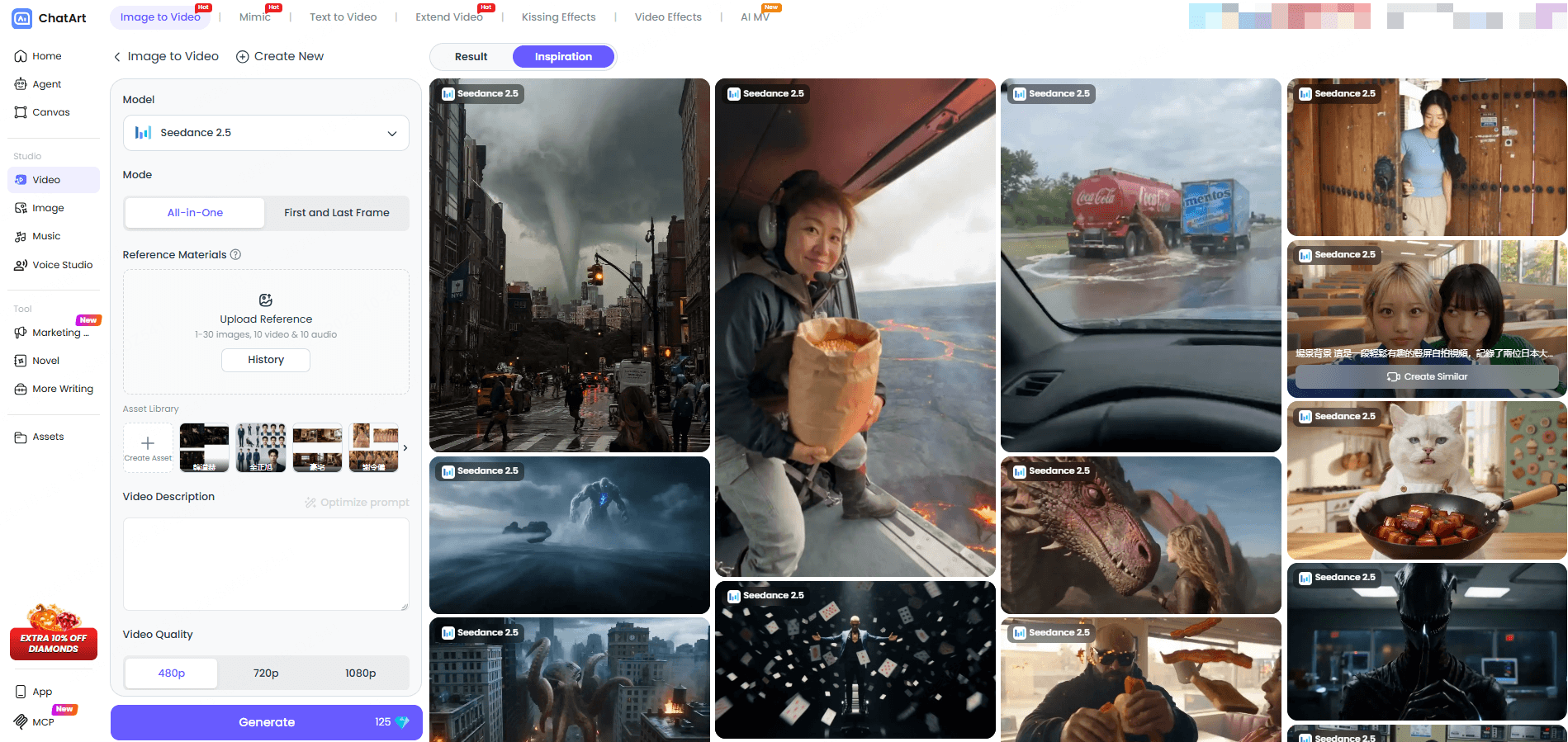
Upload a couple photo, provide multiple character references when supported, or select existing characters and scenes from your asset library.
Copy one of the 15 prompts above, customize the action, and click Generate. Preview the faces, hands, and body movement before saving your video.
Tips for Natural and Realistic AI Couple Video Motion
Ever generated a couple video where the characters suddenly switch places, their hands look strange, or the camera moves unpredictably?
The problem may be the motion instructions, not the romantic idea itself.
Compare these prompts:
Basic: "A romantic couple hugging at sunset."
Improved: "The couple slowly turns toward each other, exchanges a warm smile, and moves into a gentle embrace. Keep their faces consistent, their arms naturally positioned, and the camera steady."
The improved version gives the AI a clearer action sequence.
If your result still looks unnatural, try these fixes:
| Problem | How to Improve It |
|---|---|
| Faces change during movement | Reduce large head turns and use clearer references. |
| Arms overlap during hugs | Request a gentle side hug or simpler arm movement. |
| Characters suddenly switch positions | Define starting positions and keep the camera stable. |
| Walking looks unnatural | Use short, synchronized steps instead of fast movement. |
| Background flickers | Reduce camera movement and simplify the scene. |
Quick tip: Change one thing at a time. If the characters look right but their arms move strangely, adjust the arm instructions instead of rewriting the entire prompt.
FAQs About AI Couple Videos
1Can I make an AI couple video from two separate photos?
Yes. ChatArt supports multiple reference images when the selected model allows them. You can use two individual portraits in a compatible workflow or create a combined couple image first. Clear faces and similar camera angles can help.
2What kind of photo works best for an AI couple video?
Use a clear, well lit image with visible faces and enough space for movement. Close up photos work well for smiles and subtle gestures, while full body images are better for walking and dancing.
3Can I create an AI couple video without uploading photos?
Yes. With ChatArt's Text to Video features, you can describe fictional characters, their actions, and the setting directly. If you want a video featuring specific people, reference photos provide more control over their appearance.
4Why do faces or hands change in AI couple videos?
Complex movements and unclear references can make it difficult for AI to maintain consistency. Try simpler actions, clearer character references, and stable camera framing. You can also adjust one part of the prompt before generating again.
Conclusion
From sweet hugs to cinematic reunions, the right AI couple video prompts can turn ordinary photos into memorable moments.
Choose a prompt, match it with a suitable photo, and experiment with natural movements. Or skip the prompt writing and try a ready made couple video template. Bring your favorite moments to life with ChatArt AI Video Generator.
Remove Backgrounds in Seconds: 3 Best AI Tools to Try Online
20 Best AI Couple Photo Prompts for Romantic & Realistic Pictures
AI Image Generator No Restrictions? What to Know in 2026 | ChatArt