Audio to Masterpiece: Visualize Your Imagination
Upload your MP3 or WAV file and let ChatArt analyze the rhythm and mood automatically. Generate cinematic scenes that match your music and turn audio into a professional MV in minutes.
The easiest way to make your own AI music video. Just upload your track and get a pro-level MV instantly for free.
Create My Music VideoModel
Image
Supported formats: JPG, PNG
Max file size: 10MB
Supported formats: JPG, PNG
Max file size: 10MB
Music
MP3, M4A, AAC, WAV · Max 20MB · Full track ≥ 10s · Clip 10–180s
High-quality visuals, perfectly timed to your beat.


From cinematic visuals to high-energy beats, see what’s possible when your music meets our AI.
Turn any track into a viral AI MV in minutes. High-quality visuals, precise beat sync, and a seamless all-in-one creative workflow.
Upload your MP3 or WAV file and let ChatArt analyze the rhythm and mood automatically. Generate cinematic scenes that match your music and turn audio into a professional MV in minutes.
Smart rhythm detection ensures every scene and transition hits the beat perfectly, delivering a smooth and immersive viewing experience.
Create videos for TikTok (9:16), YouTube (16:9), and Instagram (1:1) instantly. Built-in viral effects and cinematic filters help boost engagement and traffic.
Write lyrics, generate music, and create MVs in one platform. A complete AI creative workflow without switching tools.
Bring your music to life with ChatArt. No professional editing skills required—just your creativity and our AI.
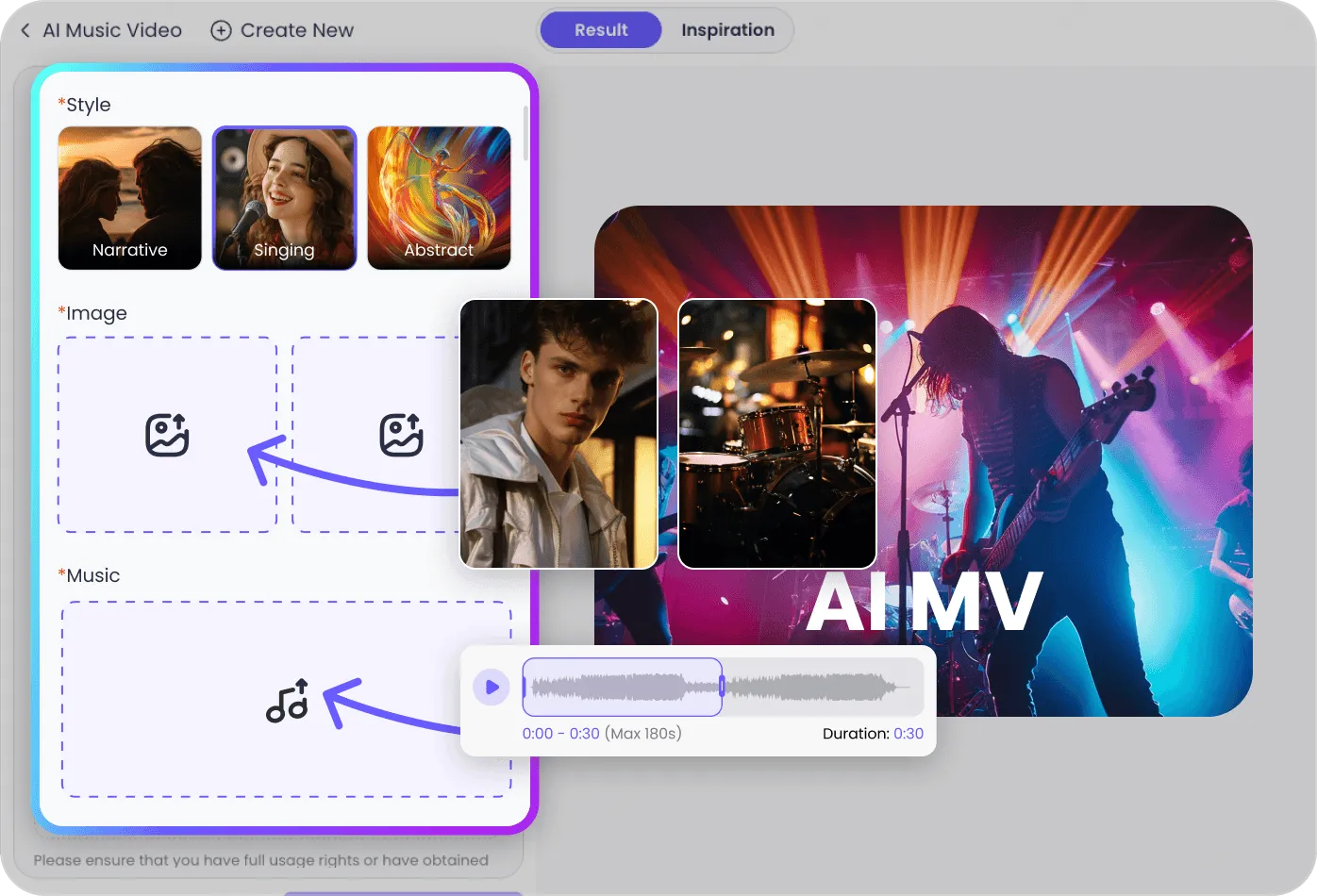

Upload your audio (up to 20MB) and a photo of your protagonist. You can also use the ChatArt AI Music Generator to create a custom track from scratch.
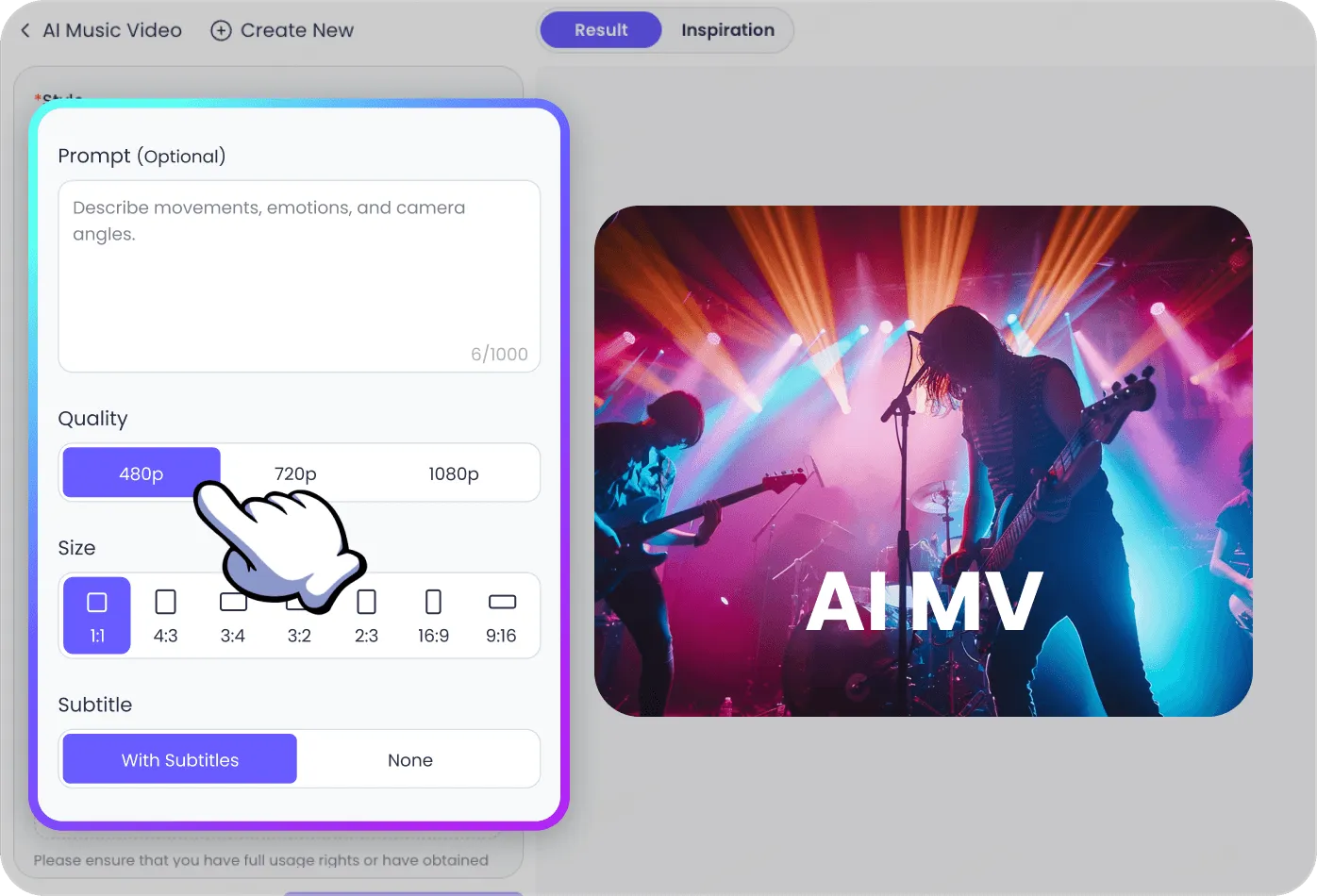
Enter a video description (optional) to guide the AI’s creativity. Select your preferred aspect ratio (9:16 or 16:9) and choose the generation quality to match your vision.
Click “Generate Video” and let ChatArt do the heavy lifting. In just minutes, your professional, perfectly-synced music video will be ready to watch and download.
Boost your productivity with our specialized AI features. Visit the links below to learn how ChatArt can support your next big project.
ChatArt AI MV Generator
An AI music video generator turns a song, reference images, and creative instructions into a complete video without manual timeline editing. With ChatArt, you upload a vocal track and character image, choose a visual style and performance mode, and describe the result you want. ChatArt then generates an original music video built around those inputs.
Yes. ChatArt can create a lip-synced music video from a song and a clear character photo. Art MV 8 offers Singing mode for full lip sync and Music Performance mode for performance-focused videos with partial lip sync. For the best facial results, use a close-up, front-facing photo with clearly visible facial features.
Art MV 8 supports four purpose-built modes: Singing for lip-synced performances, Music Performance for stage-style visuals, Story Performance for narrative music videos, and Dance Performance for movement-led clips. You can also choose a visual preset or describe a custom style, giving creators more control over the mood, setting, camera direction, and overall look.
Choose Art MV 8 when you want purpose-built Singing, Music Performance, Story Performance, and Dance Performance modes. Choose Art MV 7 when you want a separate lip-sync switch within a more direct creation flow. Available generation settings vary by model and are shown after you select one.
Start with a clear character image and a song containing vocals. You can optionally add a second image to define the scene, select the section of the song you want to use, and add instructions for the story, mood, camera, or visual style. Supported file formats and input limits are shown in the upload panel for the model you select.
Yes. ChatArt offers vertical, landscape, and square layouts for TikTok, Reels, Shorts, YouTube, Instagram, and other social platforms. The available aspect ratios are shown for the model you select. Subject to your subscription status, source-material rights, and ChatArt’s Terms & Conditions, generated videos may also be published and monetized for social media, marketing, and other commercial projects.
High-definition visuals and perfect beat-syncing. Experience the easiest way to visualize your music for free.